Before you start
- A self-contained HTML prototype or supported React artifact.
- A connected AI with publish access and a review task with no real customer data.
Connect your AI to the work
Open Stash and choose Connect your AI tools. Authorize your client, then check that it can read the intended work before asking it to edit. The connection uses MCP, a way for AI tools to read and update work in another service.
For a new publication, explicitly ask for private access. New MCP artifacts otherwise allow public editing. Your selected space is the default publishing destination, not a limit on everything the connection can access.
See the connection and handoff workflow. Client availability and workspace permissions can vary.
The workflow
- 01
Prepare a small runnable prototype
Use the workshop example or ask your AI for a self-contained HTML page with CSS and small client-side interactions. Remove secrets, production credentials and live payment actions. If the project needs a backend or unsupported dependencies, prepare a reduced demonstration or use an appropriate hosting environment for the full application.
- 02
Publish privately and inspect it
Ask the connected AI to publish with private access explicitly, then open the returned artifact. Click the intended path yourself. Confirm that images load, text is readable and links behave as expected. A rendered first screen is not proof that every interaction works.
- 03
Check desktop and narrow layouts
Review the prototype at a desktop width and a narrow phone-like width. Look for clipped text, overlapping controls and horizontal scrolling. Use an actual phone as an additional check where possible. Resizing a preview is useful for layout review, but it does not reproduce every device, browser, keyboard or assistive technology.
- 04
Give the reviewer a task
Create an exact-version comment invitation. Ask “Find the next available workshop and tell me what you expect after choosing it.” Explain that the page is a demo and booking is simulated. For a nontechnical client, describe the intended outcome rather than source files or frameworks. Ask them to comment where expectations break.
- 05
Hand off the decision and the source
Collect the chosen direction, unresolved questions and constraints in a brief. A developer needs the source, intended behavior, asset references and known limitations as well as the demo. Share the appropriate work-level access if they need history or source through an AI connection; an exact-version invitation is intentionally narrower.
WORKED EXAMPLE
Review the workshop booking path
The supplied HTML contains a link to workshop dates and a local “Preview booking” interaction. It sends no booking and collects no customer data.
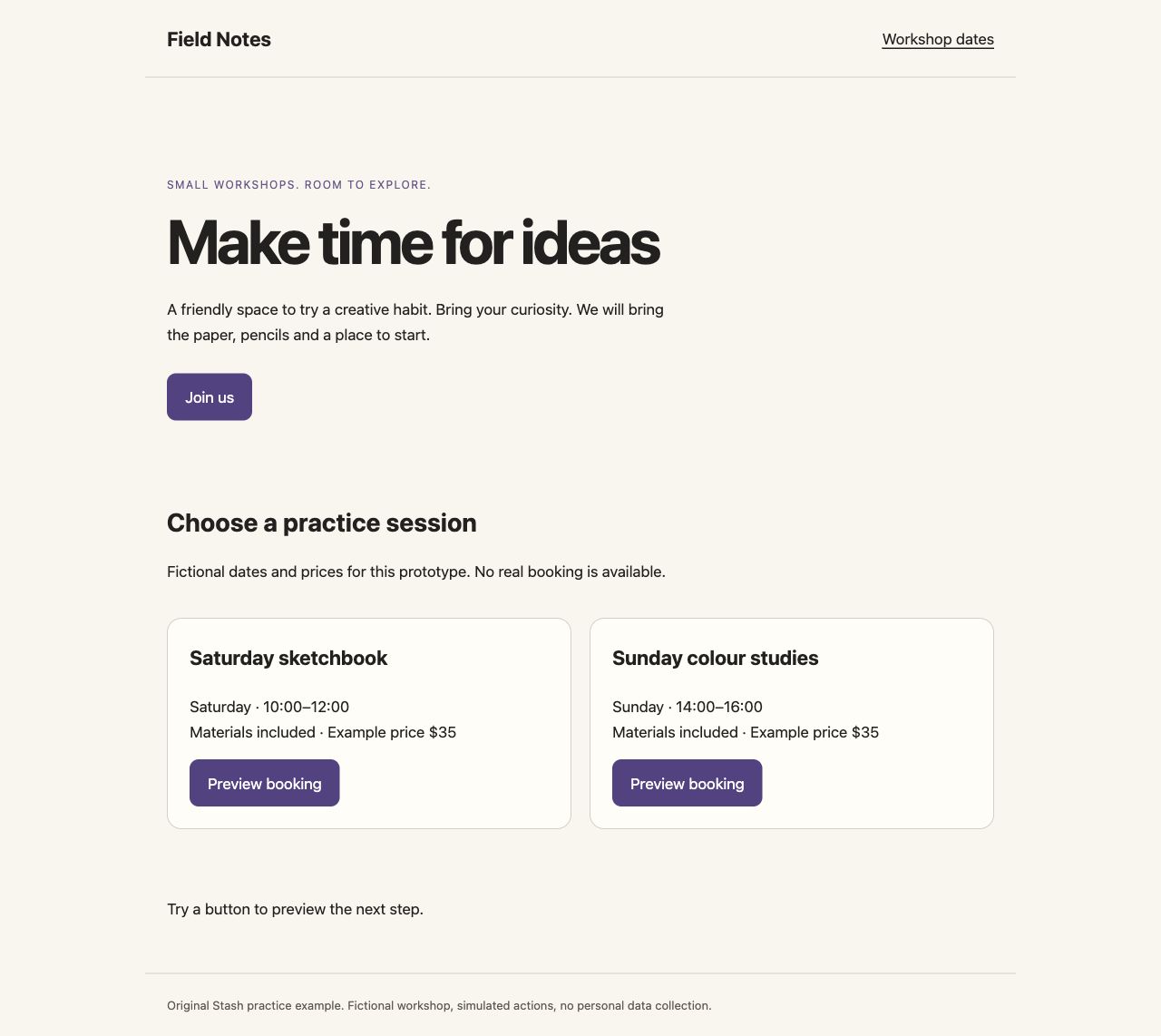
Starting point
A client receives raw HTML by email and cannot tell which interaction matters or whether booking is real.
A clearer result
The client opens a fixed preview with one task: find the Saturday workshop, try the demo button and comment on anything unclear.
Check the result
- Desktop and narrow layouts are readable.
- The demo button displays a simulation message.
- The review brief names the version and the unfinished behavior.
Original practice files
Fictional examples made for these guides. Download them to try the workflow with your own tools.
A prompt you can use
Replace the bracketed fields with your project details. Check what the AI can access before requesting changes.
Publish this self-contained HTML as a private Stash artifact using access: private. It is a client-review prototype, not a production service. Keep all data fictional and label simulated actions. Return the work and version links. Then give me a review checklist for the main path, narrow layout, keyboard access and known limitations.Download the brief, prompt and checklist ↓
Questions & answers
How do I share an interactive HTML prototype with a client?
Publish a supported HTML artifact and send an exact-version invitation with the appropriate review permission. Give the client a short task and explain which interactions are simulated.
How do I get feedback on an AI landing page before building it?
Share the actual prototype and ask the reviewer to complete the main visitor task. Collect comments on comprehension, hierarchy and the action path before investing in production implementation.
How do I present an interactive demo to a nontechnical client?
Open with the problem the demo solves, then give the client one concrete task. Explain what works and what is simulated. Avoid presenting a source-code tour when the decision is about the user experience.
How do I hand off an AI-generated landing-page mockup to a developer?
Provide the demo, source, selected version, assets, intended interactions and unresolved decisions. Ask the developer to assess accessibility, security, dependencies and production architecture separately.
How do I review AI websites on desktop and mobile?
Inspect the same version at wide and narrow widths, then check on real devices when needed. Look at text wrapping, navigation, touch targets and the main task. A preview is not a full browser or device testing service.
Keep in mind
- Stash renders supported artifacts; it is not general hosting for arbitrary backend applications or npm dependency trees.
- A prototype review does not establish production readiness, accessibility compliance or security.
Put it into practice.
Start with the example or bring a small project of your own.
Open Stash to publish a prototype ↗