Before you start
- An HTML or other supported editable artifact in Stash, plus an AI connection with edit access.
- A named decision maker and one review question. For Canva/Figma exports, make the final edit in the original design tool.
Connect your AI to the work
Open Stash and choose Connect your AI tools. Authorize your client, then check that it can read the intended work before asking it to edit. The connection uses MCP, a way for AI tools to read and update work in another service.
For a new publication, explicitly ask for private access. New MCP artifacts otherwise allow public editing. Your selected space is the default publishing destination, not a limit on everything the connection can access.
See the connection and handoff workflow. Client availability and workspace permissions can vary.
The workflow
- 01
Choose the version and the decision
Open the version you want reviewed. Write a review brief with the audience, goal and deadline: “Can a first-time visitor understand the workshop and find the booking button?” Keep the artifact private, then use Share to create an exact-version invitation with Can comment. Check general access too: a restricted invitation does not make a public artifact private.
- 02
Collect one request per comment
Ask reviewers to point to a detail, describe the problem and name the desired result. “The CTA is weak” is harder to act on than “Change Join us to Book a workshop so visitors know what happens next.” For a remote review, let people read silently first, then discuss unresolved points. Keep decisions in the comments rather than only in the call.
- 03
Separate corrections, preferences and conflicts
A wrong date is a correction. A preference for warm colours is a design choice. Two requests for different headlines need a decision, not an average. Ask the decision maker to choose and record the reason. Have the AI propose a revision brief, but do not let it silently treat every stakeholder suggestion as an instruction.
- 04
Make a bounded new version
Give the AI the work link, exact baseline version and agreed changes. Ask it to read the source and all relevant comment pages before editing. Preserve the original and request a new version with a short change summary. For a flattened image, ask for editing instructions and apply them to the Canva/Figma source instead of claiming the export has editable layers.
- 05
Verify and close the loop
Compare the two versions and check the agreed requests one by one. Reply to the original threads with what changed and where. Resolve only the addressed feedback. Share the new version explicitly: the previous exact-version link still shows the previous review. Record approval separately if your team requires formal signoff.
WORKED EXAMPLE
A clearer workshop booking page
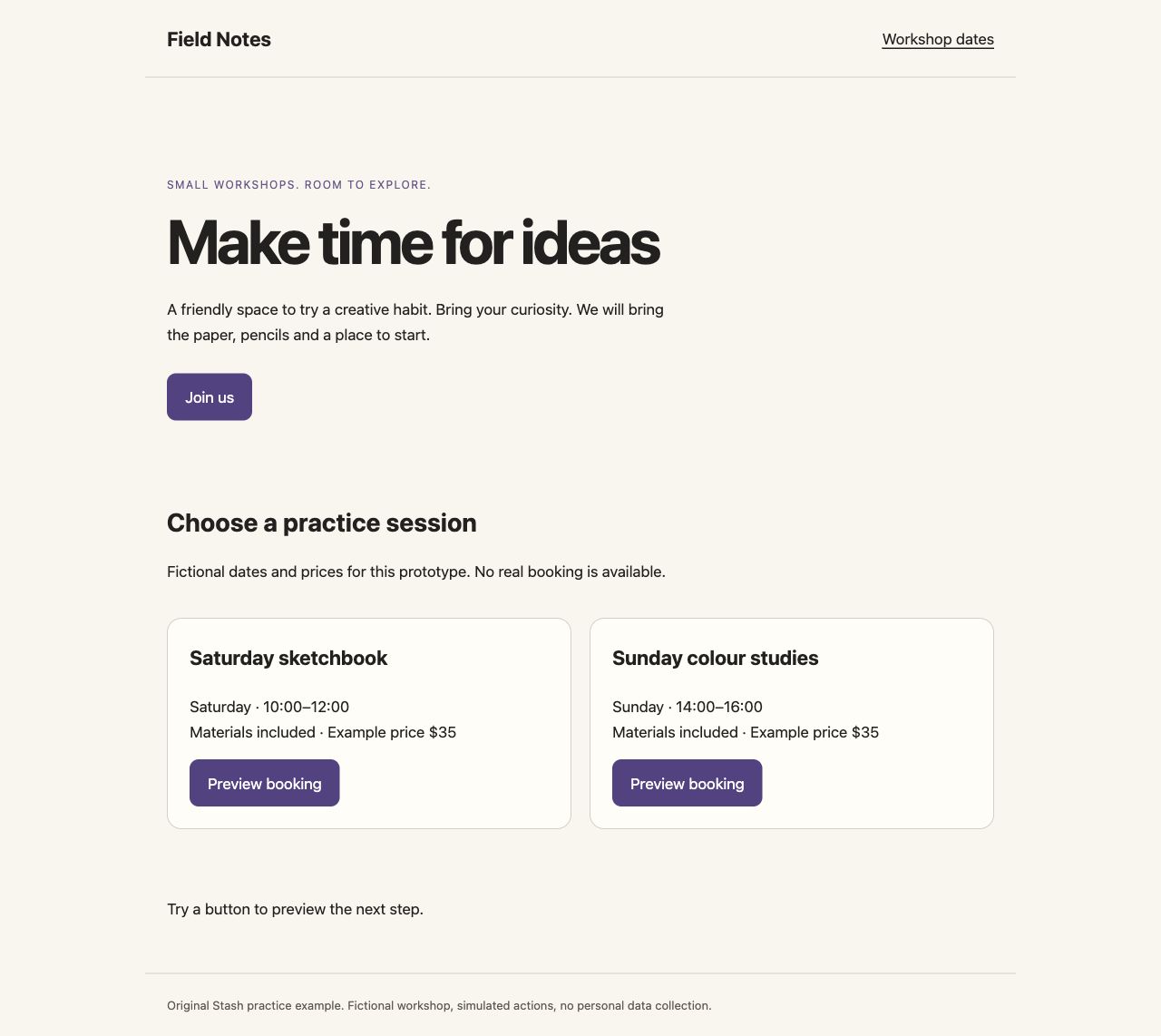
An illustrative revision for Field Notes, a fictional creative workshop. The downloadable HTML supplies the baseline; this is a worked example, not a customer case study.
Starting point
The page says “Make time for ideas” with a button labelled “Join us”. One reviewer asks for clearer booking language; another asks to replace the entire layout.
A clearer result
The decision maker keeps the layout and approves “Book your next creative workshop” plus “See workshop dates”. The next review checks only the headline, CTA and whether the link reaches the dates section.
Check the result
- The two requested text changes are present.
- The navigation, pricing and page layout remain unchanged.
- The old version still opens; the new review points to the new version.
Original practice files
Fictional examples made for these guides. Download them to try the workflow with your own tools.
A prompt you can use
Replace the bracketed fields with your project details. Check what the AI can access before requesting changes.
Use the connected Stash tools to read [work URL], baseline [version ID], including all pages of comments. First summarize corrections, preferences and conflicts. Apply only these approved changes: [list]. Preserve [constraints]. Create a new version of the existing work, keep access unchanged, and do not change the shared pin. Return the version link and a request-by-request change summary. Do not resolve comments until I have checked the result.Download the brief, prompt and checklist ↓
Questions & answers
How do I turn client feedback into AI design revisions?
Use a fixed review version, agree which comments to implement, then ask your connected AI to read that source and publish a new version. Check the result against the agreed list. Exported Canva/Figma images need changes in their original design file.
How do I keep comments attached to the correct design version?
Use an exact-version comment invitation and include the version in the review brief. Share a new invitation for a new revision. A work-level link and a fixed-version invitation serve different review needs.
How do I show what changed between design revisions?
Show the baseline and revision together, then list each requested change and its location. Inspect the result yourself; a generated change summary is not proof that every change was made.
How do I turn conflicting stakeholder comments into one revision brief?
Group comments into corrections, preferences and conflicts. Ask the decision maker to resolve conflicts and publish one approved revision brief. Keep rejected suggestions and their reasons visible to the team.
How do I organise a remote design review?
Send the brief and review link before the meeting. Gather individual comments, discuss conflicts, record decisions, assign revisions and share the next fixed version. Stash holds the work and feedback; use your usual call tool for the meeting.
How do I get feedback beyond 'I don't like it'?
Ask reviewers to name the audience, point to the detail and explain what becomes unclear. “Which part makes booking difficult?” produces more actionable feedback than “Do you like it?”
How do I separate factual corrections from subjective preferences?
Check corrections against a source of truth such as an approved price or date. Label aesthetic preferences separately and judge them against the brief. Ask for clarification when a comment mixes the two.
How do I separate 'ready for feedback' from 'approved for delivery'?
Write the review status and decision maker in the brief. A comment or resolved thread is not formal approval. Use your established signoff process for final delivery; Stash does not provide a formal approval audit workflow.
Keep in mind
- AI comments and change summaries can be incomplete. Inspect the actual result.
- Revoking an invitation stops new joins; existing members may need removal separately.
Put it into practice.
Start with the example or bring a small project of your own.
Open Stash ↗